 d7559d5c24
HISTCONTROL

   A colon-separated list of values controlling how commands are saved on the history list.
   If the list of values includes ignorespace, lines which begin with a space character
   are not saved in the history list. A value of ignoredups causes lines matching the
   previous history entry to not be saved. A value of ignoreboth is shorthand for
   ignorespace and ignoredups. A value of erasedups causes all previous lines matching
   the current line to be removed from the history list before that line is saved.
   Any value not in the above list is ignored. If HISTCONTROL is unset, or does not
   include a valid value, all lines read by the shell parser are saved on the history
   list, subject to the value of HISTIGNORE. The second and subsequent lines of a
   multi-line compound command are not tested, and are added to the history regardless
   of the value of HISTCONTROL.
HyperTerm
Custom Prompt Shell Settings for Bash
Requirements
- wget
- curl
- git
Features
-
Show Git information (branch, tag, or where you did
git checkout) -
It allows knowing the status (exit status) of the Prompt Shell after executing one/some command(s).
-
Makes source to
/usr/share/doc/pkgfile/command-not-found.bashautomatically (requirespkgfile). -
Source
/usr/share/bash-completion/bash_completionautomatically (requiresbash-completion). -
Includes a
hyperterm/_custom.shfor customizations in HyperTerm, separately.Your changes must be in
$HOME/.hyperterm/_custom.sh, so that are not deleted when it is updated. -
Special functions like:
activateto activate virtualenv in pythoncexcompress files and/or directoriesexextract filesiigeneral system informationproxy_onenables proxy in terminal or ttysagent_startandsangent_stopto enable or disable the SSH agent (password is remembered for 432000 seconds)rar2zipconvert RAR files to ZIP, useunarand7z
-
Aliases like:
cleanclears the bash historydfshows information about the partitions of the S.O.pastebinallows you to quickly generate a paste for example:cat/etc/*release | pastebinorsensors | pastebinepopen a PKGBUILD with emacsfreeshows RAM and SWAP informationgrepskips its colors by defaultlashort ofls -la --group-directories-first --time-style=+"%d.%m.%Y %H:%M" --color=auto -Fllshort ofls -l --group-directories-first --time-style=+"%d.%m.%Y %H:%M" --color=auto -Flsshort ofls --group-directories-first --time-style=+"%d.%m.%Y %H:%M" --color=auto -Fnpopen a PKGBUILD with nano
-
Look at tools directory for more functions.
-
Run
screenfetchif installed (included in thehyperterm/_custom.shtemplate).
Installation
Semi-automatic
-
Download file
install.sh:$ wget https://git.sr.ht/~heckyel/hyperterm/blob/master/install.sh -O "$HOME/install.sh" -
Run file
install.sh$ bash "$HOME/install.sh"or in silent mode:
$ bash "$HOME/install.sh" -suse -h to show help:
$ bash "$HOME/install.sh" -h -
Delete file
install.sh:$ rm -v "$HOME/install.sh"
Manual
-
As a suggestion, make a backup of your Prompt Shell.
$ for f in .bashrc .bash_aliases .bash_profile; do cp -v "$HOME/$f" "$HOME/$f.bak"; done -
Clone the HyperTerm repository:
- Mirror 1:
git clone https://git.sr.ht/~heckyel/hyperterm.git "$HOME/bash" - Mirror 2:
git clone https://notabug.org/heckyel/hyperterm.git "$HOME/bash"
- Mirror 1:
-
Copy the HyperTerm files to your Local Directory
$ install -d -m755 "$HOME/.hyperterm" $ cp -rv $HOME/bash/hyperterm/* "$HOME/.hyperterm" $ cp -v $HOME/bash/.bash* "$HOME" $ cp -v $HOME/bash/hyperterm/_custom.sh "$HOME/.hyperterm" $ install -m644 $HOME/bash/template/bash_profile.template.bash "$HOME/.bashrc" -
Open your terminal again or execute the next instruction
$ . $HOME/.bashrc* -
Delete the repository if you are not interested in having it stored
$ rm -rfv bash -
Done!
Post-installation
-
Optionally you can install trash-cli, pkgfile, bind-tools, bash-completion
  $ pacman -S trash-cli

  $ pacman -S pkgfile

  $ pacman -S bind-tools

  $ pacman -S bash-completion
trash-cli: is a utility to prevent accidental deletion when using the rm -rf command
pkgfile: allows you to search for the command executed in the repository database
bind-tools: allows to get ISP, running 'ii' in terminal
bash-completion: allows bash autocomplete
Upgrade
-
To update just open the terminal and run:
updbashrcto update HyperTermupdbashrc_customjust to update filehyperterm/_custom.sh
Screenshots
Git

Themes
default
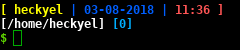
joy

light_theme

minterm

pure

special
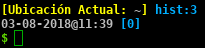
The theme is configurable from file
$HOME/.hyperterm/_custom.sh
Uninstall
Semi-automatic
-
Download file
uninstall.sh:$ wget https://git.sr.ht/~heckyel/hyperterm/blob/master/uninstall.sh -O "$HOME/uninstall.sh"o
$ wget https://notabug.org/heckyel/hyperterm/raw/master/uninstall.sh -O "$HOME/uninstall.sh" -
Run file
uninstall.sh:$ bash "$HOME/uninstall.sh" -
Delete file
uninstall.sh:$ rm -v "$HOME/uninstall.sh"
Manual
If you want to leave your computer as it was, delete the files copied from step 3 with:
$ rm -vrf "$HOME/{.hyperterm/,.bashrc}"
and restore the *.bak files from step 1 by running:
$ for f in .bashrc .bash_aliases .bash_profile; do cp -v "$HOME/$f.bak" "$HOME/$f"; done
Hacking
See HACKING.md
Contributors
HyperTerm contributors can be found in the AUTHORS file
License
This work is licensed under the GNU GPLv3+